
Single Qubit Ramsey Protocol
Download Script · Download Job
This notebook was executed using the upstream saved emulator and hardware results. No Aquila jobs were submitted during this website build.
Introduction
In this example we show how to use Bloqade to emulate a Ramsey protocol as well as run it on hardware. We will define a Ramsey protocol as a sequence of two pulses separated by a variable time gap . These protocols are used to measure the coherence time of a qubit. In practice, the Rabi frequency has to start and end at 0.0, so we will use a piecewise linear function to ramp up and down the Rabi frequency.
import osfrom decimal import Decimal
import numpy as npimport matplotlib.pyplot as pltfrom bloqade.analog import cast, load, save, start
if not os.path.isdir("data"):    os.mkdir("data")
Define the program.
define program with one atom, with constant detuning but variable Rabi frequency, where an initial pi/2 pulse is applied, followed by some time gap and a -pi/2 pulse. Note that the plateau time was chosen such that the area under the curve is pi/2 given given the constraint on how fast the Rabi frequency can change as well as the minimum allowed time step.
plateau_time = (np.pi / 2 - 0.625) / 12.5wf_durations = cast([0.05, plateau_time, 0.05, "run_time", 0.05, plateau_time, 0.05])rabi_wf_values = [0.0, 12.5, 12.5, 0.0] * 2  # repeat values twice
ramsey_program = (    start.add_position((0, 0))    .rydberg.rabi.amplitude.uniform.piecewise_linear(wf_durations, rabi_wf_values)    .detuning.uniform.constant(10.5, sum(wf_durations)))
Assign values to the variables in the program,
allowing run_time (time gap between the two pi/2 pulses)
to sweep across a range of values.
n_steps = 100max_time = Decimal("3.0")dt = (max_time - Decimal("0.05")) / n_stepsrun_times = [Decimal("0.05") + dt * i for i in range(101)]
ramsey_job = ramsey_program.batch_assign(run_time=run_times)
Run Emulation and Hardware
Like in the first tutorial, we will run the program on the emulator and hardware.
Note that for the hardware we will use the parallelize method to run multiple
copies of the program in parallel. For more information about this process, see the
first tutorial.
emu_filename = os.path.join(os.path.abspath(""), "data", "ramsey-emulation.json")
if not os.path.isfile(emu_filename):    emu_batch = ramsey_job.bloqade.python().run(10000)    save(emu_batch, emu_filename)
hardware_filename = os.path.join(os.path.abspath(""), "data", "ramsey-job.json")if not os.path.isfile(hardware_filename):    batch = ramsey_job.parallelize(24).braket.aquila().run_async(shots=100)    save(batch, hardware_filename)
Plot the results
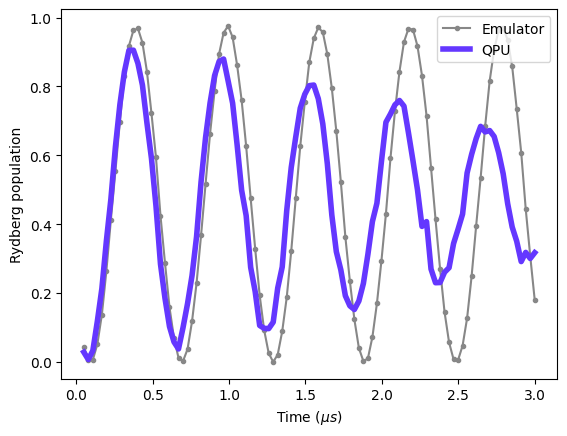
Exactly like in the Rabi Oscillation example, we can now plot the results from the
hardware and emulation together. Again we will use the report to calculate the mean
Rydberg population for each run, and then plot the results.
first we load the results from the emulation and hardware.
emu_batch = load(emu_filename)hardware_batch = load(hardware_filename)# hardware_batch.fetch()# save(filename, hardware_batch)Next we can calculate the Rydberg population for each run and plot the results.
hardware_report = hardware_batch.report()emulator_report = emu_batch.report()
times = emulator_report.list_param("run_time")density = [1 - ele.mean() for ele in emulator_report.bitstrings()]plt.plot(times, density, color="#878787", marker=".", label="Emulator")
times = hardware_report.list_param("run_time")density = [1 - ele.mean() for ele in hardware_report.bitstrings()]
plt.plot(times, density, color="#6437FF", linewidth=4, label="QPU")plt.xlabel("Time ($\mu s$)")plt.ylabel("Rydberg population")plt.legend()plt.show()