

Programming Logical Gadgets on Gemini-Physical
What if you wanted to program beyond just the Gemini MVP Hardware specifications, and wanted lower-level control over programming on physical qubits in your program (such as for exploring different QEC codes)?
In this notebook, we show how you can program logical operations for the Steane code, but on the physical level. You can follow a similar structure if trying to explore alternative codes on Gemini-Physical.
To run this notebook with the appropriate dependencies, you can run
pip install "bloqade-lanes[sim, visualization]"
# For postprocessingimport numpy as np
# Define the Gemini physical dialect that we will be writing programs in, as well as types used by our kernels.from bloqade import squinfrom bloqade.gemini import physicalfrom bloqade.gemini.common.dialects import qubitfrom bloqade.types import Qubitfrom kirin.dialects import ilist, debugfrom typing import Any, Literal, TypeVar
# Define simulator and compilation passesfrom bloqade.gemini.device import GeminiPhysicalSimulatorfrom bloqade.lanes.arch.gemini.logical import steane7_initialize
# Define physical architecturefrom bloqade.lanes.arch.gemini.physical import get_arch_spec as get_physical_arch_specfrom bloqade.lanes.heuristics.physical.movement import make_physical_placement_strategyfrom bloqade.lanes.passes import ALAPPlacePass, ASAPPlacePass
# Visualize the architecturefrom bloqade.lanes.visualize.arch import ArchVisualizer
Terminology
Section titled “Terminology”Before we get started, it’s useful to define how we address our architecture. We have three “levels” to addressing atoms in our architecture: zones, words, and sites. A concrete depiction of the architecture for Gemini physical is shown below:
physical_arch_spec = get_physical_arch_spec()ArchVisualizer(physical_arch_spec).plot_interactive()From the above architecture visualizer, we can see the layout of the atoms, as well as the buses for the architecture. (For a primer on buses, refer to the “Tutorial of Gemini Architecture”).
Each SLM site in the architecture also has a particular address, which you can see by clicking the “Labels on” button. Above each atom, you’ll see a tuple of 3 integers: (zone_id, word_id, site_id).
Those three values form an address for an SLM site.
As for a definition on the terminology: a “zone” is the top-level collection of words; a “word” is a collection of “sites”, and a “site” can contain one atom.
An address for a particular atom is of the form (zone_id, word_id, site_id).
Each column has the word ID’s that are used for the logical architecture. We basically duplicate the logical architecture 8 times to obtain our physical architecture, and you can use the “site_id” to index which “box” to be in.
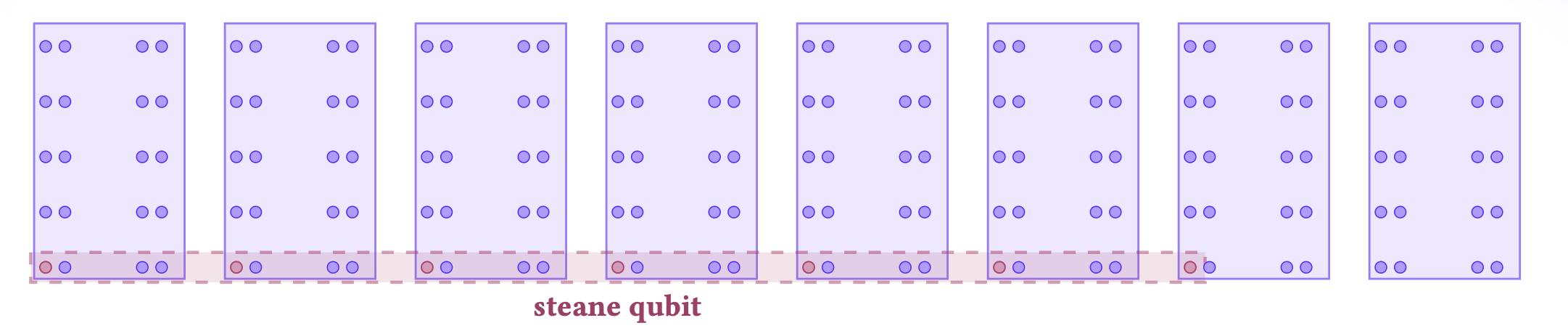
Customizing Physical Layout
Section titled “Customizing Physical Layout”One way that you can tune the performance of your program is to customize the physical layout of your atoms. You can achieve this with the “new_at” statement exposed in the “qubit” dialect.
Programming for Gemini Logical MVP, but at the physical level
Section titled “Programming for Gemini Logical MVP, but at the physical level”To give some intuition behind programming at the physical level, we showcase how you can write effectively the same program as written using the Gemini Logical dialect in terms of gates and atom moves, but by programming at the physical instead of the logical level.
Although this might seem initially redundant, programming at the physical level gives you flexibility to customize logical-to-physical implementations as you explore implementations of different codes.
# We define a LogicalQubit which is a list of 7 qubits.LogicalQubit = ilist.IList[Qubit, Literal[7]]
# We make slight changes to our physical dialect to add a "debug" dialect, which is used by our state prep kernel.kernel = physical.kernel.add(debug)kernel.run_pass = physical.kernel.run_pass
def steane_slot_allocator(): """Generates a qubit allocator for logical qubits. Tries to allocate logical qubits into the architecture in an efficient way to make parallelism in the logical gadgets as easily as possible in the move compiler.
""" # We define "slots", which are locations in the processor where we can allocate a logical qubit. slot_words = ilist.IList([0, 2, 4, 6, 8, 10, 12, 14, 16, 18])
# Creates "slots" to allocate logical qubits. Logical qubits are all allocated within # the first seven sites of one word for this particular gadget. slots = ilist.IList( [ ilist.IList([(0, word_id, site_id) for site_id in range(7)]) for word_id in slot_words ] )
# Define a kernel for allocating a logical qubit at a particular slot (shorthand) @kernel(verify=False) def qalloc_slot( slot_index: int, theta: float, phi: float, lam: float ) -> LogicalQubit: def allocate_at(address: tuple[int, int, int]): return qubit.new_at(address[0], address[1], address[2])
addresses = slots[slot_index]
reg = ilist.map(allocate_at, addresses)
# Apply a state preparation kernel on your logical qubits. steane7_initialize(theta, phi, lam, reg)
return reg
# Define a kernel for allocating multiple logical qubits at different slots @kernel(verify=False) def qalloc( slot_indices: list[int] | ilist.IList[int, Any], theta: float = 0.0, phi: float = 0.0, lam: float = 0.0, ) -> ilist.IList[LogicalQubit, Any]:
def _inner(slot_index: int): return qalloc_slot(slot_index, theta, phi, lam)
return ilist.map(_inner, slot_indices)
return qalloc, qalloc_slot# Create these gadgets that allow you to allocate qubits at particular words on the Gemini Physical architectureqalloc, qalloc_slot = steane_slot_allocator()
N = TypeVar("N")# Define a helper function for flattening a nested list of logical qubits (for syntax, because)# our gadgets act on the physical qubit level@kernel(verify=False)def flat( reg: ilist.IList[LogicalQubit, Any],) -> ilist.IList[Qubit, Any]: """Flatten a logical register into a single list of physical qubits"""
def _inner(cumulant, ele): return cumulant + ele
return ilist.foldl(_inner, reg, ilist.IList([]))Defining Gadgets
Section titled “Defining Gadgets”You can define gadgets for your logical program by defining kernels that act on the physical qubits.
This can allow for you to customize for different gadgets with different
broadcastsemantics as well as explore non-transversal implementations of gates.
@kernel(verify=False)def cx(controls: ilist.IList[LogicalQubit, N], targets: ilist.IList[LogicalQubit, N]): """Efficient broadcasted CX gate over Steane logical qubits""" squin.broadcast.cx(flat(controls), flat(targets))@kernel(verify=False)def measure_logical_reg(logical_reg: ilist.IList[LogicalQubit, Any]): """Helper function to get around the restriction that only a single measurement is allowed in a kernel. First, flatten the logical register into physical qubits. Then, reconstruct the groups of physical measurements into groups related to logical qubits.
""" # Due to the fact that we can only meeasure once in our kernels. measurements = squin.broadcast.measure(flat(logical_reg)) logical_groups = [] for i in range(len(logical_reg)): logical_groups = logical_groups + [measurements[7 * i : 7 * i + 7]]
return logical_groups# Below, we define a four qubit GHZ state as an example kernel.@kernel(typeinfer=True, aggressive_unroll=True)def main(): reg = qalloc([0, 1, 2, 3], 0.0, 0.0, 0.0)
squin.broadcast.h(reg[0]) cx(reg[:1], reg[1:2]) cx(reg[:2], reg[2:])
return measure_logical_reg(reg)Now, we can use our GeminiPhysicalSimulator device to visualize the atom moves. As our program is on the physical level now, we can visualize the atom moves for the state preparation kernel as well.
simulator = GeminiPhysicalSimulator()physical_sim_task = simulator.task(main)physical_sim_task.visualize(arch_vis=True)Compiler Feature: ASAP/ALAP Scheduling
Section titled “Compiler Feature: ASAP/ALAP Scheduling”We have implemented some basic circuit optimization through our ASAP and ALAP gate scheduling, which schedule gates as soon or as late as possible, respectively. These passes are classes that you can tell the compiler to use.
physical_sim_task_asap = GeminiPhysicalSimulator(place_opt_type=ASAPPlacePass).task(main)physical_sim_task_asap.visualize(arch_vis=True)physical_sim_task_alap = GeminiPhysicalSimulator(place_opt_type=ALAPPlacePass).task(main)# For this use case, doesn't appear to produce a "nice" program. ASAP is what we want for this program.physical_sim_task_alap.visualize(arch_vis=True)Compiler Feature: Tune Compiler Search Parameters
Section titled “Compiler Feature: Tune Compiler Search Parameters”You can also provide a custom placement_strategy that defines an alternative move_solutions_per_layer, search_budget, and strategy.
The compiler will run a graph-based search algorithm to compile your circuit to atom moves.
placement_strategy = make_physical_placement_strategy( move_solutions_per_layer=10, search_budget=None, strategy="ids")physical_msd_task = GeminiPhysicalSimulator( place_opt_type=ASAPPlacePass, placement_strategy=placement_strategy,).task(main)physical_msd_task.visualize(arch_vis=True)Running Tasks using Physical Simulator
Section titled “Running Tasks using Physical Simulator”Similar to the simulator task for the logical simulator, we can also run the tasks for the physical simulator using “task.run()”.
physical_msd_task_res = physical_msd_task.run(shots=1000)print(np.array(physical_msd_task_res.measurements).shape)(1000, 28)