
Parallelism of Static Circuits
This tutorial describes Bloqade’s tools for converting sequential quantum circuits into parallel ones and for evaluating how parallelization affects performance using realistic noise models.
Parallelism lets gates that act on disjoint qubits execute at the same time, reducing circuit depth and overall runtime. On neutral-atom quantum computers, many transversal operations (same gate type and parameters) can often be executed together in a single layer (moment).
Reducing depth typically improves fidelity and increases the number of operations that can complete within the hardware’s coherence time.
Bloqade supports both automatic and manual parallelization. The examples below show both methods and compare fidelity using representative noise models.
Example 1: GHZ Circuit
Section titled “Example 1: GHZ Circuit”What is parallelism?
Section titled “What is parallelism?”We take the GHZ state preparation as an example. It prepares the state
The GHZ state can be prepared using a sequence of Hadamard and CNOT gates. In a linear (sequential) implementation, the CNOT gates are applied one after another, resulting in a circuit depth that grows linearly with the number of qubits. In contrast, a log-depth (parallel) implementation arranges the CNOT gates so that multiple gates acting on disjoint qubits can execute simultaneously, reducing the overall depth to logarithmic in the number of qubits. This comes at the cost of requiring arbitrary connectivity, which is not native to all architectures. However, it is perfect for reconfigurable neutral atom systems, which have a native “all to all” connectivity through mid-circuit atom shuttling.
import warnings
import cirqimport numpy as npimport matplotlib.pyplot as pltimport bloqade.cirq_utils as utilsfrom cirq.contrib.svg import SVGCircuit
from bloqade import squin, cirq_utils
warnings.filterwarnings("ignore")
def build_linear_ghz(n_qubits: int) -> cirq.Circuit: """ Build a linear GHZ circuit using squin and convert to Cirq. Inputs: n_qubits: Number of qubits in the GHZ state. Returns: cirq.Circuit: The constructed linear GHZ circuit. """
@squin.kernel def linear_ghz_kernel(): q = squin.qalloc(n_qubits) squin.h(q[0]) for i in range(n_qubits - 1): squin.cx(q[i], q[i + 1])
# Create LineQubits for compatibility with existing code qubits = cirq.LineQubit.range(n_qubits) circuit = cirq_utils.emit_circuit(linear_ghz_kernel, circuit_qubits=qubits) return circuit
def build_log_ghz(n_qubits: int) -> cirq.Circuit: """ Build logarithmic-depth GHZ circuit using squin and convert to Cirq. Inputs: n_qubits: Number of qubits in the GHZ state. Returns: cirq.Circuit: The constructed log-depth GHZ circuit. """
max_iterations = int(np.ceil(np.log2(n_qubits))) if n_qubits > 1 else 1
@squin.kernel def log_ghz_kernel(): q = squin.qalloc(n_qubits) squin.h(q[0])
for level in range(max_iterations): width = 2**level for i in range(n_qubits): if i < width: target = i + width if target < n_qubits: squin.cx(q[i], q[target])
# Create LineQubits for compatibility with existing code qubits = cirq.LineQubit.range(n_qubits) circuit = cirq_utils.emit_circuit(log_ghz_kernel, circuit_qubits=qubits) return circuit
linear_ghz = build_linear_ghz(12)log_ghz = build_log_ghz(12)SVGCircuit(linear_ghz)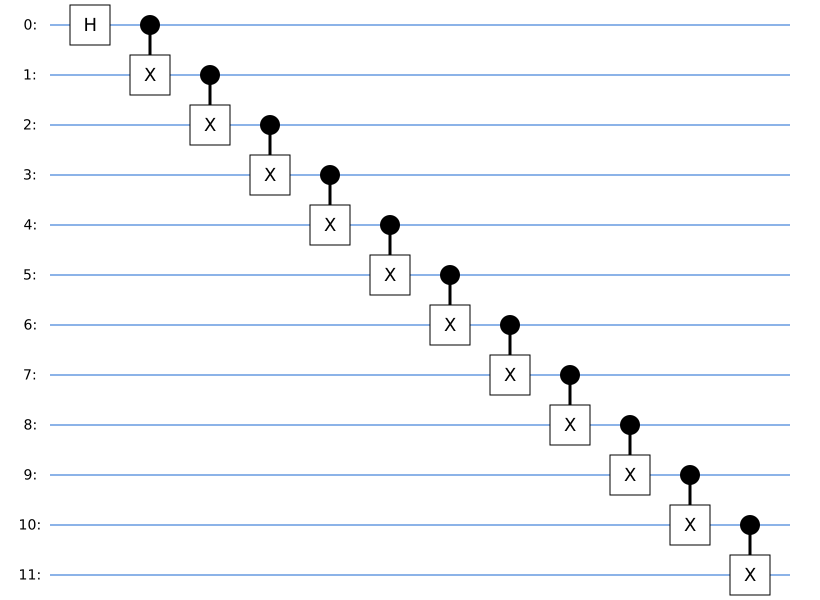
SVGCircuit(log_ghz)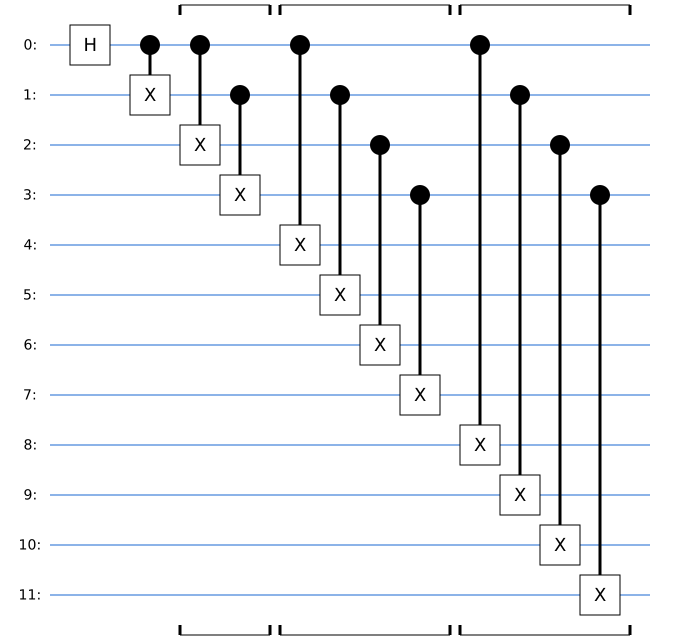
The benefits of parallelism
Section titled “The benefits of parallelism”We’ll run noise simulations for both circuits and compare their fidelities as we scale the number of qubits.
See our blog post Simulating noisy circuits for near-term quantum hardware for detailed information about the noise model used here. The analysis workflow is:
- Build a noiseless (ideal) circuit.
- Choose a noise model (we use the Gemini noise model).
- Apply the noise model to the circuit to produce a noisy circuit.
- Simulate the noisy circuit to obtain the final density matrix.
- Simulate the ideal circuit and compare its state to the noisy density matrix to compute fidelity.
# Initialize noise model (using Gemini one-zone architecture)noise_model = utils.noise.GeminiOneZoneNoiseModel()simulator = cirq.DensityMatrixSimulator()We run noise-model simulations for circuit sizes from 2 to 10 qubits and compute the fidelity (higher is better). The ideal noiseless circuit has fidelity 1 by construction.
# Scan a range of qubit numbers and compute fidelitiesfidelities_linear = []fidelities_log = []num_qubits = list(range(2, 11))# Test both linear and log GHZ circuits with noise modelfor n in num_qubits:    # Linear GHZ circuit    linear_circuit = build_linear_ghz(n)
    # Log GHZ circuit    log_circuit = build_log_ghz(n)
    # Apply noise model    linear_noisy_circuit = utils.noise.transform_circuit(        linear_circuit, model=noise_model    )    log_noisy_circuit = utils.noise.transform_circuit(log_circuit, model=noise_model)
    # Simulate noiseless circuits    rho_linear = simulator.simulate(linear_circuit).final_density_matrix    rho_log = simulator.simulate(log_circuit).final_density_matrix
    # Simulate noisy circuits    rho_linear_noisy = simulator.simulate(linear_noisy_circuit).final_density_matrix    rho_log_noisy = simulator.simulate(log_noisy_circuit).final_density_matrix
    # Calculate fidelities    fidelity_linear = np.trace(rho_linear @ rho_linear_noisy).real    fidelity_log = np.trace(rho_log @ rho_log_noisy).real
    # Store results    fidelities_linear.append(fidelity_linear)    fidelities_log.append(fidelity_log)
Fidelity comparison plot:
# Create comparison plotplt.figure(figsize=(10, 6))
plt.plot(    num_qubits,    fidelities_linear,    "ro-",    label="Linear GHZ",    linewidth=2,    markersize=8,)plt.plot(    num_qubits,    fidelities_log,    "bo-",    label="Log-depth GHZ",    linewidth=2,    markersize=8,)
plt.xlabel("Number of Qubits", fontsize=14)plt.ylabel("Fidelity", fontsize=14)plt.title(    "GHZ State Fidelity Comparison: Linear vs Log-Depth Circuits",    fontsize=16,)plt.legend(fontsize=12)plt.grid(True, alpha=0.3)plt.xticks(num_qubits)plt.axis([1.5, 10.5, 0.6, 1.0])# Add annotations for better understandingplt.text(    0.15,    0.98,    "Higher fidelity = Better performance",    transform=plt.gca().transAxes,    fontsize=12,    verticalalignment="top",    bbox=dict(boxstyle="round", facecolor="wheat", alpha=0.5),)
plt.tight_layout()plt.show()
# Print summary statisticsprint("\n=== Summary Statistics ===")print(    f"Linear GHZ: Mean = {np.mean(fidelities_linear):.4f}, Std = {np.std(fidelities_linear):.4f}")print(    f"Log-depth GHZ: Mean = {np.mean(fidelities_log):.4f}, Std = {np.std(fidelities_log):.4f}")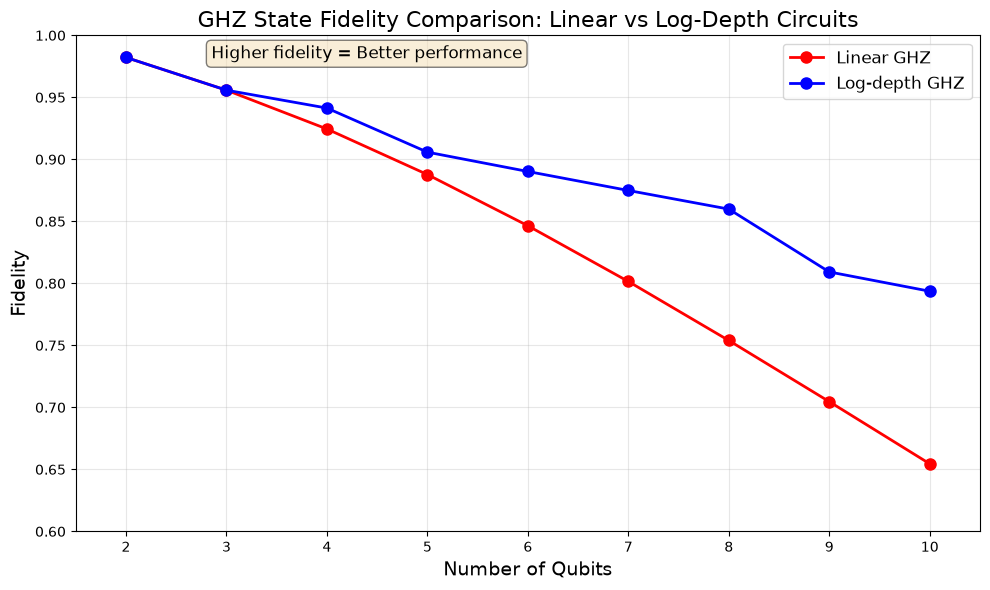
=== Summary Statistics ===Linear GHZ: Mean = 0.8346, Std = 0.1077Log-depth GHZ: Mean = 0.8903, Std = 0.0602The GHZ results show that parallelizing gates increases fidelity compared with the sequential implementation. The log-depth circuit consistently outperforms the linear-depth circuit, with the advantage growing as we increase the number of qubits. The log-depth curve drops more sharply when adding a qubit requires another CNOT layer, notably from 4 to 5 and from 8 to 9 qubits.
Automatic toolkits for circuit parallelization
Section titled “Automatic toolkits for circuit parallelization”Bloqade provides automatic tools to compress circuits into more parallel forms:
import bloqade.cirq_utils as utils
# Parallelize a circuitparallel_circuit = utils.parallelize(circuit)
# Remove internal tags (for cleaner visualization)parallel_circuit = utils.remove_tags(parallel_circuit)
The algorithm builds a DAG of gate dependencies (only commuting gates can be reordered), then solves an integer linear program (ILP) to assign gates to moments while minimizing circuit depth. Similar gates are attracted to the same moment via weighted objectives.
Example 2: [7,1,3] Steane code circuit
Section titled “Example 2: [7,1,3] Steane code circuit”Let’s explore manual and automatic parallelism optimization on the Steane code, which is a prototypical quantum error-correcting code that encodes one logical qubit into seven physical qubits, and can correct a single-qubit error.
We construct several versions of the [7,1,3] Steane code encoder circuit, based on three different initial circuits. The seq circuit deliberately applies as many operations sequentially as possible. The 11-CNOT circuit is the textbook version of the Steane code, which uses 11 CNOT gates to perform the encoding. The 9-CZ circuit is an optimized version that reduces the number of entangling gates to 9 CZ gates by using √Y and √Y† gates instead of Hadamards.
| Version | Description | Parallelization |
|---|---|---|
| seq | Sequential circuit using CZ gates (native to neutral atoms) | Manual |
| seq-auto | Auto-parallelized sequential circuit | Auto |
| 11-CNOT | Textbook encoder using 11 CNOT gates | Manual |
| 11-CNOT-auto | Auto-parallelized 11-CNOT circuit | Auto |
| 9-CZ | Optimized encoder using 9 CZ gates with √Y and √Y† gates | Manual |
| 9-CZ-auto | Auto-parallelized 9-CZ circuit | Auto |
The 9-CZ encoder’s output agrees with the 11-CNOT encoder after exchanging output-qubit labels 4 and 5 and applying Y on output qubit 3 and Z on output qubit 6, up to a global phase. The exchanged labels do not add a physical SWAP gate. Each fidelity below compares a circuit’s noisy output with its own ideal output.
def build_steane_code_circuit():    """Build the Steane code circuit (version a) using CZ gates - native to neutral atoms, but designed to be as sequential as possible."""
    @squin.kernel    def steane_kernel():        q = squin.qalloc(7)
        # H gate on qubits 1, 2, 3        squin.h(q[1])        squin.h(q[2])        squin.h(q[3])
        # Encode the logical qubit with CZ and H gates (equivalent to CNOT)        squin.h(q[0])        squin.cz(q[1], q[0])        squin.cz(q[2], q[0])        squin.h(q[4])        squin.cz(q[2], q[4])        squin.cz(q[6], q[4])        squin.h(q[5])        squin.cz(q[6], q[5])        squin.cz(q[3], q[5])        squin.cz(q[1], q[5])        squin.h(q[5])        squin.h(q[6])        squin.cz(q[1], q[6])        squin.cz(q[2], q[6])        squin.h(q[6])        squin.cz(q[3], q[4])        squin.h(q[4])        squin.cz(q[3], q[0])        squin.h(q[0])
    # Create LineQubits for compatibility with existing code    qubits = cirq.LineQubit.range(7)    circuit = cirq_utils.emit_circuit(steane_kernel, circuit_qubits=qubits)    return circuit

def build_steane_11cnot() -> cirq.Circuit:    """Build the Steane code encoder (version b) with 11 CNOT gates - textbook version.
    This is the standard Steane code encoder circuit where:    - Qubit 6 is the data qubit |ψ⟩ to be encoded    - Qubits 0-5 are ancillas initialized to |0⟩    - H gates prepare superposition on control qubits    - 11 CNOT gates create the encoded state    """
    @squin.kernel    def steane_11cnot_kernel():        q = squin.qalloc(7)
        # H gates on qubits 1, 2, 3 (ancilla preparation)        squin.h(q[1])        squin.h(q[2])        squin.h(q[3])
        # 11 CNOT gates following textbook Steane code structure        # First layer of CNOTs        squin.cx(q[6], q[5])        squin.cx(q[1], q[0])        squin.cx(q[2], q[4])        squin.cx(q[2], q[0])        squin.cx(q[3], q[5])        squin.cx(q[1], q[5])        squin.cx(q[6], q[4])        squin.cx(q[2], q[6])        squin.cx(q[3], q[4])        squin.cx(q[3], q[0])        squin.cx(q[1], q[6])
    qubits = cirq.LineQubit.range(7)    circuit = cirq_utils.emit_circuit(steane_11cnot_kernel, circuit_qubits=qubits)    return circuit

def build_steane_9cz() -> cirq.Circuit:    """Build the nine-CZ Steane encoder (version c).
    This version uses √Y and √Y† gates instead of some Hadamards,    reducing the two-qubit gate count from 11 to 9. Its output matches    the 11-CNOT encoder after exchanging output labels 4 and 5 and    applying Y on output qubit 3 and Z on output qubit 6,    up to a global phase.    """
    @squin.kernel    def steane_9cz_kernel():        q = squin.qalloc(7)
        # Initial √Y† layer on ancilla qubits (replaces H gates)        # √Y† = Ry(-π/2)        squin.ry(-np.pi / 2, q[0])        squin.ry(-np.pi / 2, q[1])        squin.ry(-np.pi / 2, q[2])        squin.ry(-np.pi / 2, q[3])        squin.ry(-np.pi / 2, q[4])        squin.ry(-np.pi / 2, q[5])
        # First CZ layer (parallel)        squin.cz(q[1], q[2])        squin.cz(q[3], q[4])        squin.cz(q[5], q[6])
        # √Y layer        squin.ry(np.pi / 2, q[6])
        # Second CZ layer (parallel)        squin.cz(q[0], q[3])        squin.cz(q[2], q[5])        squin.cz(q[4], q[6])
        # √Y layer from 2 to 6        squin.ry(np.pi / 2, q[2])        squin.ry(np.pi / 2, q[3])        squin.ry(np.pi / 2, q[4])        squin.ry(np.pi / 2, q[5])        squin.ry(np.pi / 2, q[6])
        # Third CZ layer (parallel)        squin.cz(q[0], q[1])        squin.cz(q[2], q[3])        squin.cz(q[4], q[5])
        # Final √Y layer        squin.ry(np.pi / 2, q[1])        squin.ry(np.pi / 2, q[2])        squin.ry(np.pi / 2, q[4])
    qubits = cirq.LineQubit.range(7)    circuit = cirq_utils.emit_circuit(steane_9cz_kernel, circuit_qubits=qubits)    return circuit
# Build all Steane circuit versions (reuse already defined noise models and simulator)steane_seq = build_steane_code_circuit() # Sequential CZ-basedsteane_seq_auto = utils.parallelize(circuit=steane_seq) # Auto-parallelizedsteane_seq_auto = utils.remove_tags(steane_seq_auto)
steane_11cnot = build_steane_11cnot() # 11 CNOT textbooksteane_11cnot_auto = utils.parallelize(circuit=steane_11cnot) # Auto-parallelizedsteane_11cnot_auto = utils.remove_tags(steane_11cnot_auto)
steane_9cz = build_steane_9cz() # 9 CZ optimizedsteane_9cz_auto = utils.parallelize(circuit=steane_9cz) # Auto-parallelizedsteane_9cz_auto = utils.remove_tags(steane_9cz_auto)seq: Sequential CZ-based Steane Circuit
Section titled “seq: Sequential CZ-based Steane Circuit”SVGCircuit(steane_seq)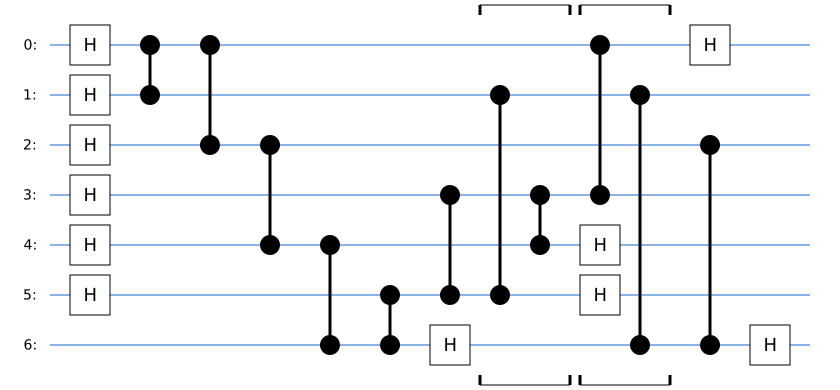
seq-auto: Auto-Parallelized Sequential Circuit
Section titled “seq-auto: Auto-Parallelized Sequential Circuit”SVGCircuit(steane_seq_auto)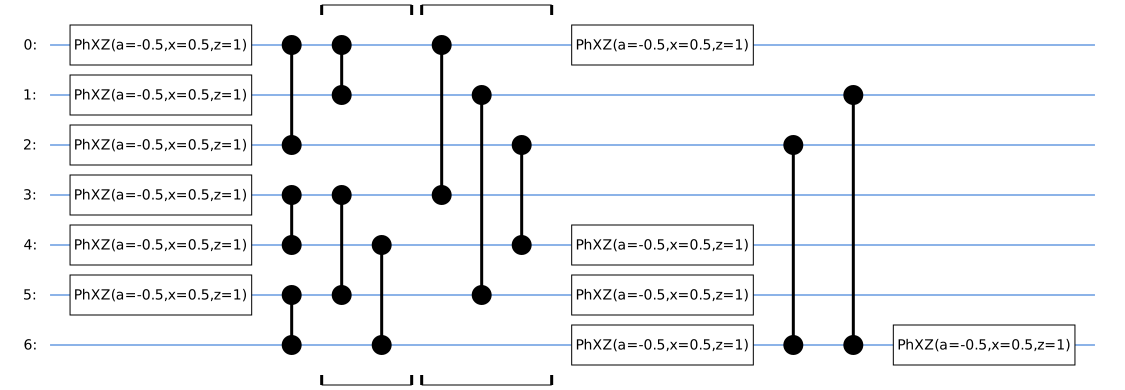
11-CNOT: Textbook Steane Encoder
Section titled “11-CNOT: Textbook Steane Encoder”SVGCircuit(steane_11cnot)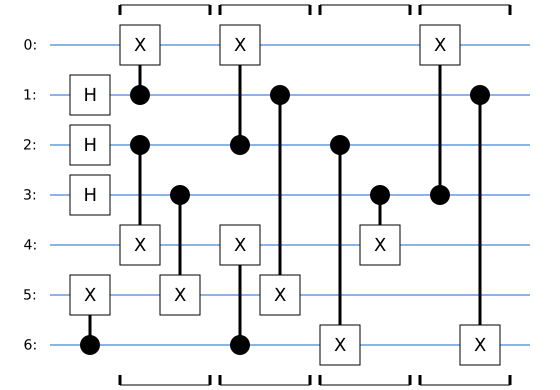
11-CNOT-auto: Auto-Parallelized 11-CNOT Circuit
Section titled “11-CNOT-auto: Auto-Parallelized 11-CNOT Circuit”SVGCircuit(steane_11cnot_auto)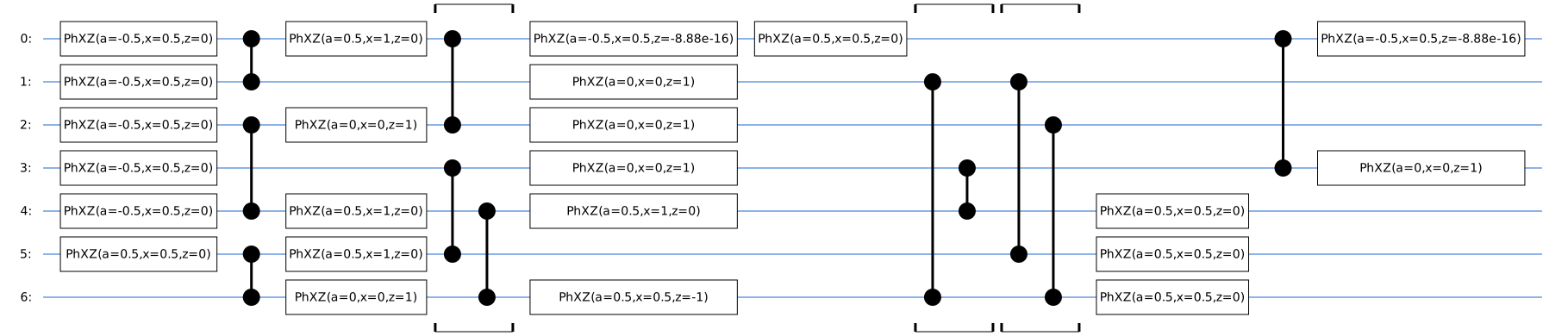
9-CZ: Optimized Steane Encoder
Section titled “9-CZ: Optimized Steane Encoder”SVGCircuit(steane_9cz)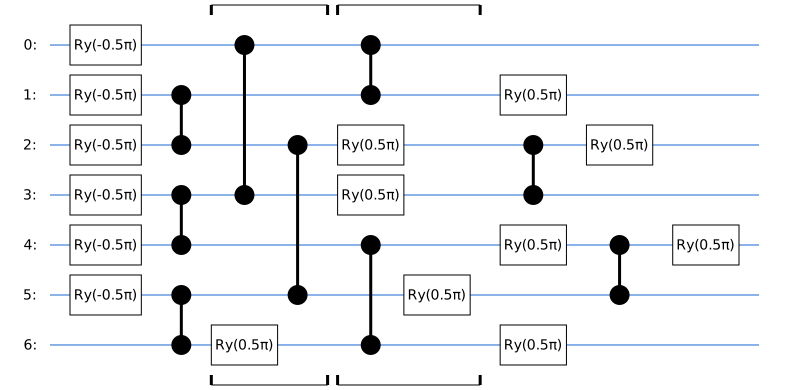
9-CZ-auto: Auto-Parallelized 9-CZ Circuit
Section titled “9-CZ-auto: Auto-Parallelized 9-CZ Circuit”SVGCircuit(steane_9cz_auto)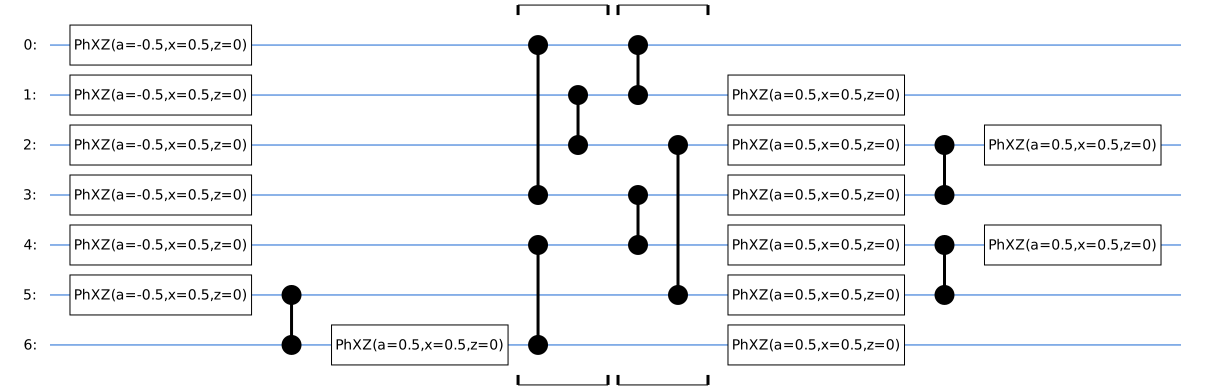
Circuit Depths
Section titled “Circuit Depths”Lower circuit depth can reduce idle time and associated errors, although fidelity also depends on gate types and noise.
print(f"seq: {len(steane_seq)} moments")print(f"seq-auto: {len(steane_seq_auto)} moments")print(f"11-CNOT: {len(steane_11cnot)} moments")print(f"11-CNOT-auto: {len(steane_11cnot_auto)} moments")print(f"9-CZ: {len(steane_9cz)} moments")print(f"9-CZ-auto: {len(steane_9cz_auto)} moments")seq: 11 momentsseq-auto: 8 moments11-CNOT: 5 moments11-CNOT-auto: 11 moments9-CZ: 7 moments9-CZ-auto: 8 momentsNoise Analysis
Section titled “Noise Analysis”# Compute fidelities for all circuit versionssteane_circuits = { "seq": steane_seq, "seq-auto": steane_seq_auto, "11-CNOT": steane_11cnot, "11-CNOT-auto": steane_11cnot_auto, "9-CZ": steane_9cz, "9-CZ-auto": steane_9cz_auto,}
steane_fidelities = {}for name, circuit in steane_circuits.items(): noisy = utils.noise.transform_circuit(circuit, model=noise_model) rho_ideal = simulator.simulate(circuit).final_density_matrix rho_noisy = simulator.simulate(noisy).final_density_matrix steane_fidelities[name] = np.trace(rho_ideal @ rho_noisy).real
# Print summaryprint(f"{'Version':<15} {'Depth':<10} {'Fidelity':<10}")print("-" * 35)for name, circuit in steane_circuits.items(): print(f"{name:<15} {len(circuit):<10} {steane_fidelities[name]:.4f}")
best_version = max(steane_fidelities, key=steane_fidelities.get)print(f"\nBest: {best_version} ({steane_fidelities[best_version]:.4f})")Version Depth Fidelity-----------------------------------seq 11 0.7087seq-auto 8 0.759411-CNOT 5 0.781111-CNOT-auto 11 0.74379-CZ 7 0.75739-CZ-auto 8 0.8241
Best: 9-CZ-auto (0.8241)Fidelity comparison plot for all Steane code versions:
fig, (ax1, ax2) = plt.subplots(1, 2, figsize=(14, 5))
labels = ["seq", "seq\nauto", "11-CNOT", "11-CNOT\nauto", "9-CZ", "9-CZ\nauto"]fidelity_vals = list(steane_fidelities.values())depth_vals = [len(c) for c in steane_circuits.values()]colors = ["#c0392b", "#e74c3c", "#d68910", "#f4d03f", "#1e8449", "#58d68d"]
for ax, vals, ylabel, title in [    (ax1, fidelity_vals, "Fidelity", "Steane Code: Fidelity"),    (ax2, depth_vals, "Circuit Depth", "Steane Code: Depth"),]:    bars = ax.bar(labels, vals, color=colors, edgecolor="black")    ax.set_ylabel(ylabel, fontsize=12)    ax.set_title(title, fontsize=14)    ax.grid(axis="y", alpha=0.3)    for bar, v in zip(bars, vals):        fmt = f"{v:.3f}" if isinstance(v, float) else str(v)        ax.text(            bar.get_x() + bar.get_width() / 2,            bar.get_height() + 0.01,            fmt,            ha="center",            fontsize=9,            fontweight="bold",        )ax1.set_ylim(0, 1)plt.tight_layout()plt.show()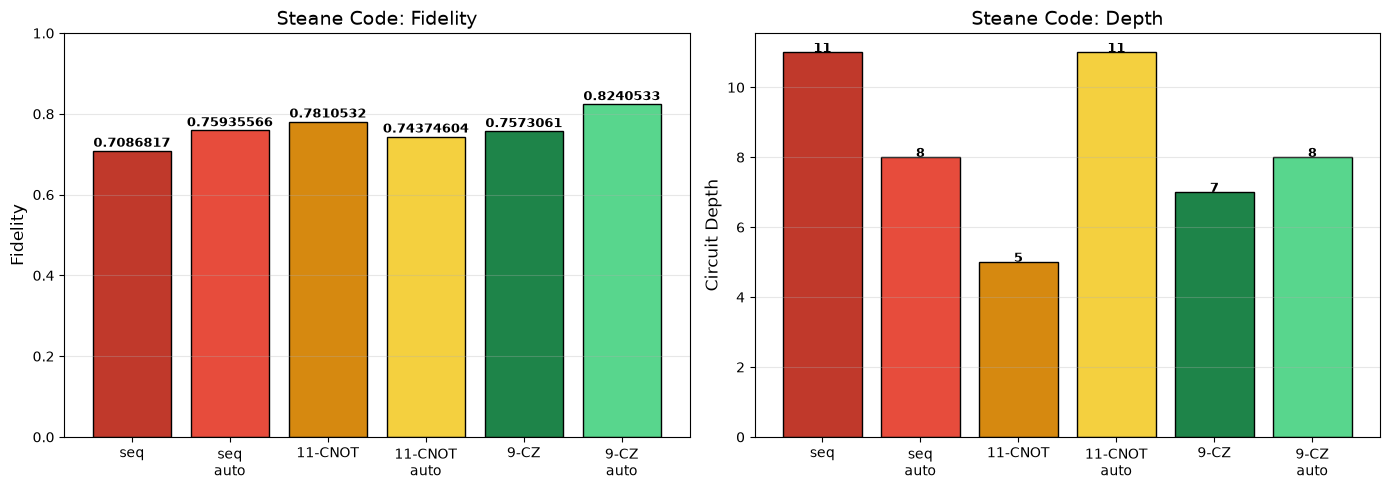
As expected, the manual and optimized circuits do better than their naively optimized counterparts. The “worst case” sequential circuit has the lowest fidelity, while the auto-optimized 9 CZ circuit has the highest fidelity. However, this also comes with a point of warning: the noise model is not a perfect representation of real hardware. In practice, the hand optimized 9-CZ circuit was implemented as part of QuEra’s magic state distillation paper, which suggests that the noise model is not aligned with hardware. The next steps after manual and automatic optimization should be implementation and tuning on real hardware.
Example 3: QAOA for MaxCut
Section titled “Example 3: QAOA for MaxCut”As a final example, consider QAOA for MaxCut on a graph. This variational circuit alternates between a cost layer that encodes the graph’s edges and a single-qubit mixer layer.
Each vertex maps to a qubit, and each edge contributes a ZZ rotation, implemented below with CZ and single-qubit gates. We repeat the cost and mixer layers times. Larger makes the ansatz more expressive; reaching an optimal cut still depends on the chosen angles.
The edge cost terms commute. Edge coloring groups disjoint edges so their gates can run in parallel; each color group becomes a block of gate layers in this decomposition. The greedy coloring used below reduces depth but need not minimize it. Let’s construct three versions of the QAOA circuit:
- Naive: Sequential circuit without optimization
- Auto-parallel: Using
utils.parallelize()for automatic optimization - Hand-tuned: Manual parallelization via edge coloring
import networkx as nx

def build_qaoa_circuit(    graph: nx.Graph, gamma: list[float], beta: list[float]) -> cirq.Circuit:    """Build a QAOA circuit for MaxCut on the given graph using squin"""    n = len(graph.nodes)    assert len(gamma) == len(beta), "Length of gamma and beta must be equal"
    # Prepare edge list for squin kernel    edges = list(graph.edges)
    @squin.kernel    def qaoa_kernel():        q = squin.qalloc(n)
        # Initial Hadamard layer        for i in range(n):            squin.h(q[i])
        # QAOA layers        for layer in range(len(gamma)):            # Cost Hamiltonian: ZZ rotation for each edge            # Using decomposition: exp(-i*gamma/2*Z⊗Z) = H → CZ → Rx(gamma) → CZ → H            for edge in edges:                u = edge[0]                v = edge[1]                squin.h(q[v])                squin.cz(q[u], q[v])                squin.rx(gamma[layer], q[v])                squin.cz(q[u], q[v])                squin.h(q[v])
            # Mixer Hamiltonian: Rx rotation on all qubits            for i in range(n):                squin.rx(2 * beta[layer], q[i])
    # Create LineQubits and emit circuit    qubits = cirq.LineQubit.range(n)    circuit = cirq_utils.emit_circuit(qaoa_kernel, circuit_qubits=qubits)
    # Convert to the native CZ gateset    circuit2 = cirq.optimize_for_target_gateset(circuit, gateset=cirq.CZTargetGateset())    return circuit2

def build_qaoa_circuit_parallelized(    graph: nx.Graph, gamma: list[float], beta: list[float]) -> tuple[cirq.Circuit, list, set]:    """Build and parallelize a QAOA circuit for MaxCut on the given graph using squin"""    n = len(graph.nodes)    assert len(gamma) == len(beta), "Length of gamma and beta must be equal"
    # A smarter implementation would use the Misra–Gries algorithm,    # which gives a guaranteed Δ+1 coloring, consistent with    # Vizing's theorem for edge coloring.    # However, networkx does not have an implementation of this algorithm,    # so we use greedy coloring as an approximation. This does not guarantee    # optimal depth, but works reasonably well in practice.    linegraph = nx.line_graph(graph)    best = 1e99    for strategy in [        "largest_first",        "smallest_last",        "independent_set",        "connected_sequential_bfs",        "connected_sequential_dfs",        "saturation_largest_first",    ]:        coloring: dict = nx.coloring.greedy_color(linegraph, strategy=strategy)        num_colors = len(set(coloring.values()))        if num_colors < best:            best = num_colors            best_coloring = coloring    coloring: dict = best_coloring    colors = [        sorted(edge for edge, color in coloring.items() if color == c)        for c in sorted(set(coloring.values()))    ]
    # This implementation applies exp(-i*gamma/2*Z⊗Z) per edge.    # We decompose this using CZ and single-qubit rotations:    #    # exp(-i*gamma/2*Z⊗Z)  =  -------o----------o-------    #                                 |          |    #                         -----H--o--Rx(g)--o--H----    #    # where Rx(gamma) = X^(gamma/pi) in Cirq notation.
    # Choose one endpoint of every edge to receive H and Rx rotations.    # These endpoints form a vertex cover. A minimum vertex cover minimizes    # the number of distinct qubits receiving H gates, not necessarily the    # total number of H gates. We approximate a maximum independent set;    # its complement is a vertex cover, but need not be minimum.    mis = nx.algorithms.approximation.maximum_independent_set(graph)    hadamard_qubits = set(graph.nodes) - set(mis)
    # Prepare data structures for squin kernel    # Flatten color groups and create parallel lists for indices    all_edges = []    h_qubits = []    for color_group in colors:        for edge in color_group:            all_edges.append(edge)            u, v = edge            if u in hadamard_qubits:                h_qubits.append(u)            else:                h_qubits.append(v)
    # Build the circuit using squin    @squin.kernel    def qaoa_parallel_kernel():        q = squin.qalloc(n)
        # Initial Hadamard layer        for i in range(n):            squin.h(q[i])
        # QAOA layers        for layer in range(len(gamma)):            # Cost Hamiltonian: process edges in order            edge_start = 0            for color_group in colors:                group_size = len(color_group)
                # First Hadamard layer                for i in range(group_size):                    h_qubit = h_qubits[edge_start + i]                    squin.h(q[h_qubit])
                # First CZ layer                for i in range(group_size):                    edge = color_group[i]                    u = edge[0]                    v = edge[1]                    squin.cz(q[u], q[v])
                # Rotation layer (Rx)                for i in range(group_size):                    h_qubit = h_qubits[edge_start + i]                    squin.rx(gamma[layer], q[h_qubit])
                # Second CZ layer                for i in range(group_size):                    edge = color_group[i]                    u = edge[0]                    v = edge[1]                    squin.cz(q[u], q[v])
                # Second Hadamard layer                for i in range(group_size):                    h_qubit = h_qubits[edge_start + i]                    squin.h(q[h_qubit])
                edge_start = edge_start + group_size
            # Mixer Hamiltonian: Rx rotation on all qubits            for i in range(n):                squin.rx(2 * beta[layer], q[i])
    # Create LineQubits and emit circuit    qubits = cirq.LineQubit.range(n)    circuit = cirq_utils.emit_circuit(qaoa_parallel_kernel, circuit_qubits=qubits)
    # This circuit will have some redundant doubly-repeated Hadamards that can be removed.    # Let's do that now by merging single qubit gates to phased XZ gates, which is the native    # single-qubit gate on neutral atoms.    circuit2 = cirq.merge_single_qubit_moments_to_phxz(circuit)    # Do any last optimizing...    circuit3 = cirq.optimize_for_target_gateset(        circuit2, gateset=cirq.CZTargetGateset()    )
    return circuit3, colors, hadamard_qubits
# Build circuits on a small graph for visualization and fidelity comparisongraph = nx.random_regular_graph(d=3, n=10, seed=42)
qaoa_naive = build_qaoa_circuit(graph, gamma=[np.pi / 2], beta=[np.pi / 4])qaoa_parallel, colors_parallel, hadamard_qubits = build_qaoa_circuit_parallelized( graph, gamma=[np.pi / 2], beta=[np.pi / 4])qaoa_autoparallel = utils.parallelize(qaoa_naive)
print(f"Naive circuit depth: {len(qaoa_naive)}")print(f"Auto-parallel depth: {len(qaoa_autoparallel)}")print(f"Hand-tuned parallel depth: {len(qaoa_parallel)}")Naive circuit depth: 27Auto-parallel depth: 17Hand-tuned parallel depth: 11The hand-tuned circuit is shallower for this graph. For fixed , its depth grows with the number of edge-color groups. An optimal coloring uses or groups, where is the graph’s maximum degree; the greedy coloring here may use more.
Circuit Visualization
Section titled “Circuit Visualization”SVGCircuit(qaoa_naive)
SVGCircuit(qaoa_parallel)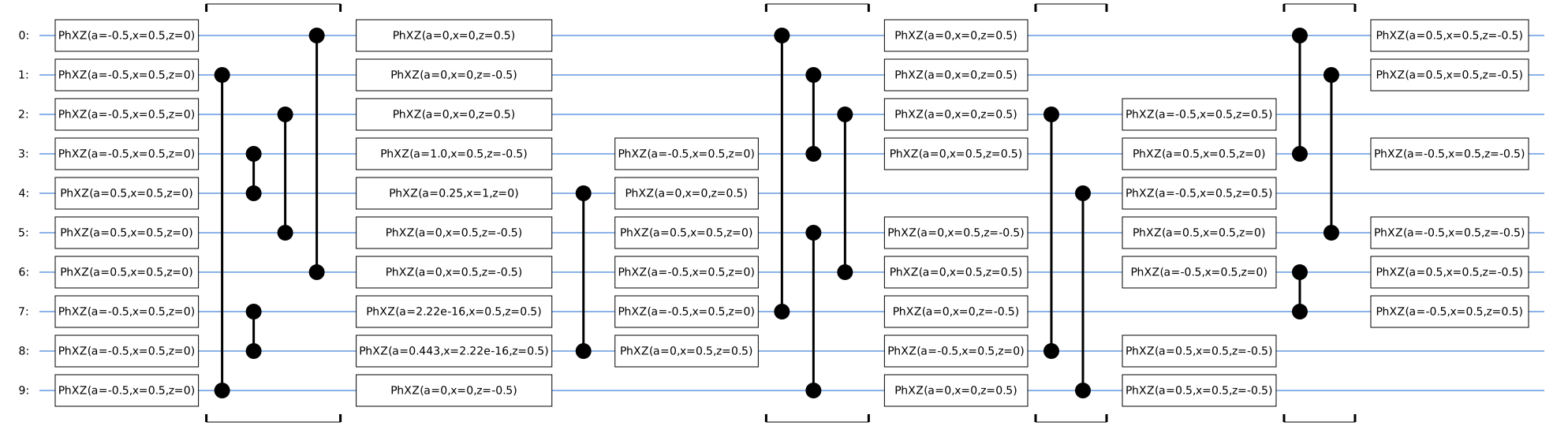
Edge Coloring Visualization
Section titled “Edge Coloring Visualization”The parallelization can be visualized as an edge coloring of the graph. Edges of the same color share no vertices, so their operations can be executed in parallel within a block of gate layers.
def visualize_graph_with_edge_coloring(    graph: nx.Graph, colors: list, title: str, pos: dict, hadamard_qubits: set):    """Show edge-color groups and the endpoint receiving H/Rx rotations.
    Each arrow points toward the selected H/Rx endpoint. CZ is symmetric,    so the arrows do not represent control and target qubits.    """    fig, ax = plt.subplots(figsize=(8, 8))    ax.set_aspect("equal")
    nx.draw_networkx_nodes(graph, pos, node_color="lightblue", node_size=500)    nx.draw_networkx_labels(graph, pos, font_size=12, font_weight="bold")
    edge_colors = ["red", "blue", "green", "orange", "purple", "brown", "pink", "gray"]    for color_idx, color_group in enumerate(colors):        edge_color = edge_colors[color_idx % len(edge_colors)]        for edge in color_group:            u, v = edge            # Point toward the endpoint receiving H and Rx rotations.            if u in hadamard_qubits:                other, rotated = v, u            else:                other, rotated = u, v            x1, y1 = pos[other]            x2, y2 = pos[rotated]
            # Draw edge line            plt.plot([x1, x2], [y1, y2], color=edge_color, linewidth=2.5, zorder=-1)
            # Draw an arrow toward the H/Rx endpoint            mid_x, mid_y = (x1 + x2) / 2, (y1 + y2) / 2            dx, dy = x2 - x1, y2 - y1            plt.arrow(                mid_x - dx * 0.08,                mid_y - dy * 0.08,                dx * 0.16,                dy * 0.16,                head_width=0.04,                head_length=0.02,                fc=edge_color,                ec=edge_color,                linewidth=1.5,            )
    legend_elements = [        plt.Line2D(            [0],            [0],            color=edge_colors[i % len(edge_colors)],            lw=4,            label=f"Color group {i + 1} ({len(colors[i])} edges)",        )        for i in range(len(colors))    ]    # Add arrow explanation to legend    legend_elements.append(        plt.Line2D(            [0],            [0],            color="black",            lw=0,            marker=">",            markersize=10,            label="Arrow points to H/Rx endpoint",        )    )    plt.legend(handles=legend_elements, loc="upper left", fontsize=10)    plt.title(title, fontsize=14)    plt.axis("off")    plt.tight_layout()    plt.show()
# Visualize the edge-color groups used by the hand-tuned circuit.pos = nx.kamada_kawai_layout(graph)visualize_graph_with_edge_coloring( graph, colors_parallel, f"Hand-Tuned Parallelization: {len(colors_parallel)} color groups", pos=pos, hadamard_qubits=hadamard_qubits,)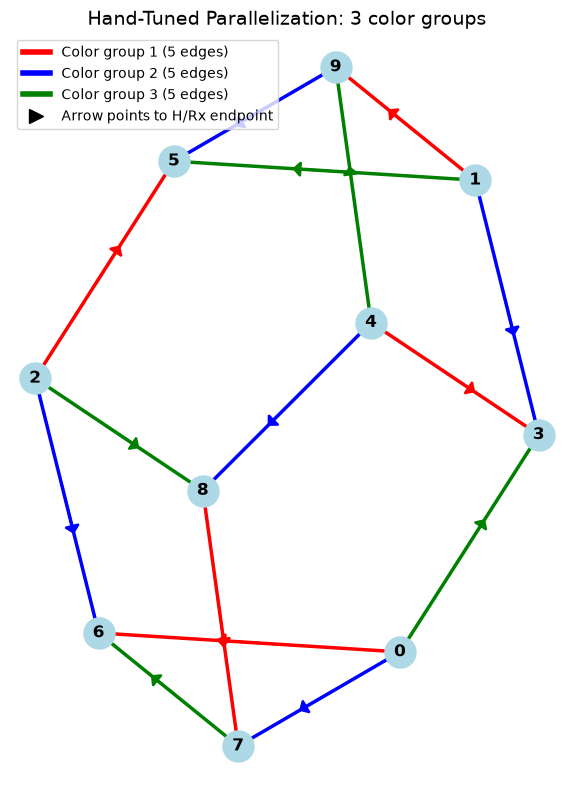
Fidelity Comparison
Section titled “Fidelity Comparison”qaoa_circuits = { "Naive": qaoa_naive, "Auto-parallel": qaoa_autoparallel, "Hand-tuned": qaoa_parallel,}qaoa_fidelities = {}for name, circuit in qaoa_circuits.items(): noisy = utils.noise.transform_circuit(circuit, model=noise_model) rho_ideal = simulator.simulate(circuit).final_density_matrix rho_noisy = simulator.simulate(noisy).final_density_matrix qaoa_fidelities[name] = np.trace(rho_ideal @ rho_noisy).realfig, (ax1, ax2) = plt.subplots(1, 2, figsize=(10, 4))labels = list(qaoa_circuits.keys())fidelity_vals = list(qaoa_fidelities.values())depth_vals = [len(c) for c in qaoa_circuits.values()]colors = ["#c0392b", "#d68910", "#1e8449"]
for ax, vals, ylabel, title in [ (ax1, fidelity_vals, "Fidelity", "QAOA: Fidelity"), (ax2, depth_vals, "Circuit Depth", "QAOA: Depth"),]: bars = ax.bar(labels, vals, color=colors, edgecolor="black") ax.set_ylabel(ylabel, fontsize=12) ax.set_title(title, fontsize=14) ax.grid(axis="y", alpha=0.3) for bar, v in zip(bars, vals): fmt = f"{v:.3f}" if isinstance(v, float) else str(v) ax.text( bar.get_x() + bar.get_width() / 2, bar.get_height() + 0.01, fmt, ha="center", fontsize=10, fontweight="bold", )ax1.set_ylim(0, 1)plt.tight_layout()plt.show()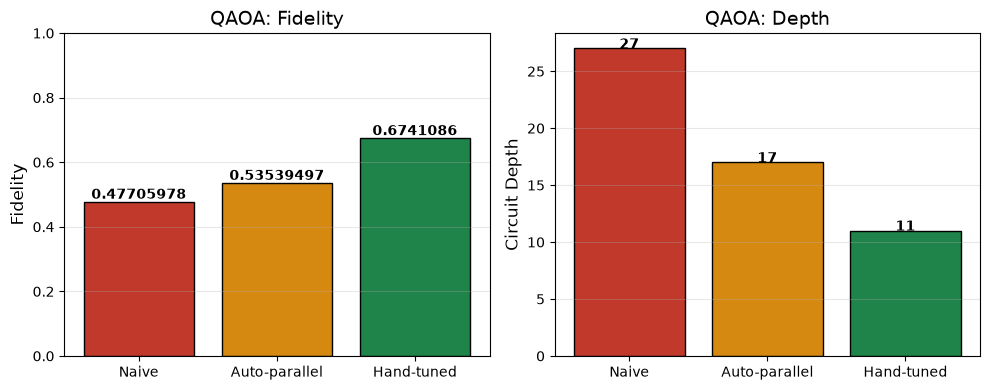
For this graph and noise model, the hand-tuned circuit has the highest simulated fidelity, followed by the automatically parallelized circuit. Both exceed the naive circuit in this example.